

I’m sorry, what’s the connection?
It’s the University of Bath’s Green Week and we all want to make the biggest changes to our carbon footprint with the lowest effort.
While no-one would normally look at Information Governance for sustainability gains, it can have a surprisingly large impact, especially in terms of digital storage.
Each file you save to the cloud cannot be touched, cannot be felt, but it is real. It sits on a server, cooled with water, powered by electricity. These emails, these reports may seem like just a drop in the ocean but when thousands of employees store and share hundreds of files every day over the course of decades, those drops quickly become lakes.
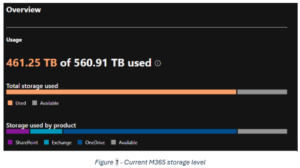
The University has 461.25 terabytes in cloud storage. Since every 100 gigabytes contributes approximately 0.2 kgCO2/year (using the 2022 U.S. electricity matrix), the University of Bath generates 922.5 tons of CO2 from cloud storage alone every year. That is the same carbon footprint as permanently keeping over ten thousand fridges switched on.
And this does not even factor in other environmental impacts of data storage such as water usage, land usage, and the generation of e-waste.
So, what can I do?
The software company, Splunk, conducted a global survey of more than 1,300 business and IT decision makers. They found that 60% of respondents use only half, or less, of their organisation’s data for analytics or decision-making.
Deleting redundant data may sound laborious and uninteresting but it doesn’t have to be. Many of these are easy to find.
The first culprit is OneDrive. It automatically creates duplicates of a lot of your files, some that you would never even know about. It saves every email attachment you have ever received, every screenshot you have ever taken, every file you have ever sent in Teams or uploaded to Copilot. Read last month’s blog, The Skeletons in Your OneDrive, to quickly find and delete them.
Additionally, if you’re like me, you download a file, read it once, save it if you need to, and then download it again the next time you need it. I am never going to use any of those files again but some server across the country, continent or world is consuming electricity to make sure I have that option should I change my mind. I’ve just now deleted my downloads – using ctrl + a, it took all of five seconds – and I recommend you do the same.
Deleting duplicate files is great but make sure you’re not generating new ones at the same time. If you share a file by attaching it to an email, you are encouraging the recipients to download it. If each of those people make edits and send them back to you, suddenly you are drowning in redundancy. Instead, share the file as a link so you can all contribute to it simultaneously, solving the duplication problem and making it easier to control who has access to it and who definitely shouldn’t. If you want to know more about the best way to share your files, check out our guidance.
If you are looking for other redundant files, then look no further than the files on your computer that you’re legally obligated to get rid of but likely haven’t gotten around to yet. When Personal Data passes its retention period, it must be deleted. All the retention periods for all the different types of Personal Data can be found in the University’s Records Retention Schedule.
Should you have any questions or suggestions for other hidden pockets of redundancy, then please get in touch with dataprotection@bath.ac.uk. Don’t forget that our friendly team are always happy to answer your questions, reducing our own carbon footprint by sparing you from using your energy-intensive AI of choice.
Too Long, Didn’t Read
- Storing data digitally leaves a carbon footprint which can quickly add up. Improve your sustainability and that of the University by deleting your redundant files.
- Duplicate files ripe for deletion can be found in your Downloads, your Screenshots, and in the OneDrive folders: Email attachments, Microsoft Teams Chat Files, and Microsoft Copilot Chat Files, as explained in last month’s blog.
- The best redundant files to get rid of are those that you are legally required to delete because they have passed their retention period. The retention periods for different types of Personal Data can be found in the University’s Records Retention Schedule.
Subscribe to the Information Governance Newsletter to learn more and be kept in the loop.
Respond