

Typing feedback
Providing high-quality assessment feedback is one of the most impactful yet time-consuming parts of teaching. This is especially true when assessing large cohorts or dealing with complex assessment tasks. Despite the care and effort involved, students sometimes report that written feedback feels impersonal or difficult to engage with. This raises a key question: could alternatives to typing help staff provide feedback that is both efficient and more meaningful for students?
Research suggests that feedback supports learning when students understand it, trust it, and act on it. When feedback is rushed, overly brief, or delayed because of marking pressures, its impact is reduced. Exploring alternative ways of producing feedback may help address both staff workload and student engagement, and this post will touch on video and audio feedback, using comment banks, and using speech-to-text functionality.
Video or audio feedback
One option is to provide feedback using audio or video recordings rather than typed text. Many learning platforms, including in Moodle, offer built-in recording tools that allow staff to speak directly to students. Research consistently shows that students often perceive audio feedback as more personal and supportive than written comments, as it conveys tone, emphasis, and encouragement more clearly. Hearing a tutor’s voice can help students feel that the feedback is genuinely directed at them rather than being generic or formulaic. Studies have also found that staff are often able to give more detailed explanations in less time when speaking rather than typing, which can be particularly helpful for complex assignments.
That said, audio and video feedback are not without challenges. There can be a learning curve in becoming comfortable with recording, and some platforms impose time limits or restrict where recordings can be added (e.g. it's not possible against individual criterion comments in Moodle rubrics). Editing audio or video feedback can also be more difficult than editing text, meaning that re-recording is sometimes the easiest option. Importantly, while many students value audio or video feedback, others still prefer, or require, written comments that they can skim, quote, or return to easily. A platform like Panopto can create automatic captions to support this or the development of a full transcript. This highlights the need for flexibility rather than a one-size-fits-all approach.
Comment bank feedback
Another strategy is the use of comment banks. Comment banks store frequently used feedback comments that can be reused and adapted for different students. When used thoughtfully, they can save time and improve consistency, particularly for recurring issues such as structure, referencing, or clarity of argument. However, there is a risk that over-reliance on pre-written comments can lead students to question whether feedback has been personalised. Research suggests that students are more likely to engage with feedback when it clearly refers to their own work, so comment banks work best when comments are actively edited and contextualised rather than copied verbatim. The CLT are currently exploring the provision of an in-house designed comment bank tool. If you would like to see it and offer your views please get in touch (Yvonne Moore).
Speech-to-text feedback
A simpler and increasingly popular alternative is the use of speech-to-text tools that are already built into most computers. With speech-to-text, staff speak their feedback and it is instantly converted into editable text. This approach combines the speed and natural tone of spoken feedback with the flexibility of written comments. Because the output is text, it can be used anywhere text is accepted, including for rubric criterion comments, and easily edited for clarity. Studies on feedback production suggest that speaking is often faster and less fatiguing than typing, particularly for longer responses, making speech-to-text a practical option for busy marking periods.
Both Windows and Apple devices include speech-to-text functionality.
Windows
On a Windows PC place the cursor where you want to add feedback, then click Windows key and H to start and stop dictation. Alternatively, you can select the microphone on the touch keyboard. If the feature needs turning on, you can enable the ‘voice typing’ feature (or 'online speech recognition'). In Settings > search Online speech recognition > enable the recognition option.
Mac
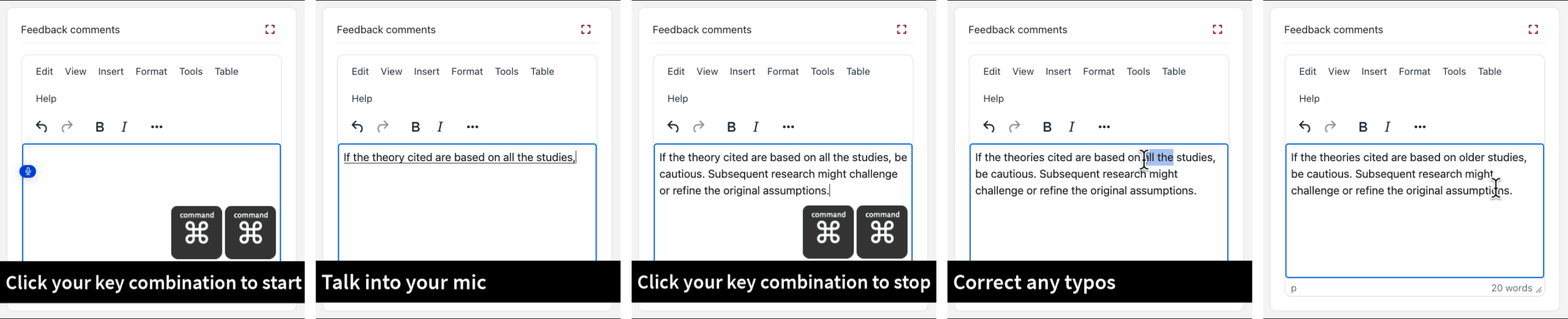
On Apple Macs, the Dictation option can be enabled in system settings and activated using a keyboard shortcut. In System settings > Keyboard > Dictation set the key combination you want to use to start transcribing your speech. Place the cursor where you want to add feedback, then use this to start and stop dictation.
Is anyone using speech-to-text at the University of Bath?
I spoke with Dr Dan Maskell from the Department of Architecture and Civil Engineering who has been using speech-to-text for giving feedback for the past 4 years. Summing up his experience:
- Compared to typing Dan can now give twice as much feedback in half the time.
- The process involves pressing a single button on the keyboard to activate dictation, making it quick and easy to use.
- There are very few errors to correct as the functionality has improved over time.
- Students are told this is how the feedback is created so they are prepared for more conversational (but still professional) feedback.
- This ensures that each piece of feedback Dan gives is unique to the student.
- Moderation of assessment/feedback has not identified any problems with the feedback given.
Which suits you?
Overall, there is no single ‘best’ way to provide assessment feedback. Typed comments, audio or video feedback, comment banks, and speech-to-text tools each have strengths and limitations. What the research makes clear, however, is that students value feedback that feels personal, is easy to understand, and arrives in time for them to use it. Speech-to-text offers a particularly promising middle ground, enabling staff to capture the richness of spoken feedback while retaining the clarity and flexibility of text.
Resources
- Pitt, E. and Quinlan, K.M. (2022) Impacts of higher education assessment and feedback policy and practice on students: a review of the literature 2016-2021, Centre for the Study of Higher Education, University of Kent
- Case Study: Video feedback in Physics (Teaching Hub, CLT)
- Killingback, C., Ahmed, O. and Williams, J. (2019), ‘It was all in your voice’ - Tertiary student perceptions of alternative feedback modes (audio, video, podcast, and screencast): A qualitative literature review, Nurse Education Today, Volume 72, pp. 32-39, doi.org/10.1016/j.nedt.2018.10.012.
- TEL Tip: How to create video and audio feedback (TEL Service Blog, CLT)
- Lunt, T. and Curran, J. (2010) ‘‘Are you listening please?’ The advantages of electronic audio feedback compared to written feedback’, Assessment & Evaluation in Higher Education, 35(7), pp. 759–769. doi: 10.1080/02602930902977772
- Speech, voice activation, inking, typing, and privacy (MS Support)
- Dictate messages and documents on Mac (Apple Support)
By Yvonne Moore (Digital Education Developments Lead, CLT)